
Attendance
1 in 4
students are chronically absent, still elevated years after the shift online.
RAND / Return to Learn Tracker, 2024-25
Delphinium transforms the Canvas courses you already teach into engaging student experiences and an early-warning system for parents and teachers. No migration. No extra work. Just turn it on.
The hidden costs
In a classroom, teachers can read the room, catch a glance, and stand by the student who is drifting. None of that survives the move to a screen.In a classroom, faculty can read the room, catch a glance, and stand by the student who is drifting. None of that survives the move to a screen.
Attendance
1 in 4
students are chronically absent, still elevated years after the shift online.
RAND / Return to Learn Tracker, 2024-25
Completion and retention
4 in 10
students drop out of college. About 2M a year leave with student loan debt, but no degree to help pay for that debt.
1 in 3
first-year students don't return for year two.
60%
of students don't finish a bachelor's in 4 years; 40% still haven't in 6.
National Center for Education Statistics (NCES / IPEDS)
AchievementHigher withdrawal rates
1 in 310–15%
students score below grade level. The lowest performers keep losing ground.for lower income and underprepared students in online courses.
The Nation's Report Card (NAEP), 2024Columbia University
CostEarnings and employment
$229K$1M
the cost of a K-12 education and lost potential when students don't finish.less in lifetime earnings without a degree, and twice as likely to be unemployed.
U.S. Census Bureau, FY2024Pew Research Center
ThreeThese are the stats that keep us up at night, and the reason we made Delphinium. crises, one cause: disengagement. Doing nothing is the most expensive option you have.
Every missed login, late assignment, and skipped module is a warning sign. Canvas records all the signals, then scatters them across pages nobody has time to read. By the time a struggling student shows up in the gradebook, the window to help them has often already closed.
Struggling students rarely speak up. They go quiet, one missed assignment at a time, until they're too far behind to catch up.
Every check-in is written by hand, one student at a time. So most of the messages that could save a student never get sent.
You get hours of digging through gradebooks and reports, paid for with nights and weekends instead of time with students.
Parents want to be the coach in their kid's corner, but most find out they're struggling after it's too late.
Stop hunting for struggling students, Delphinium brings them to you.
Control Tower
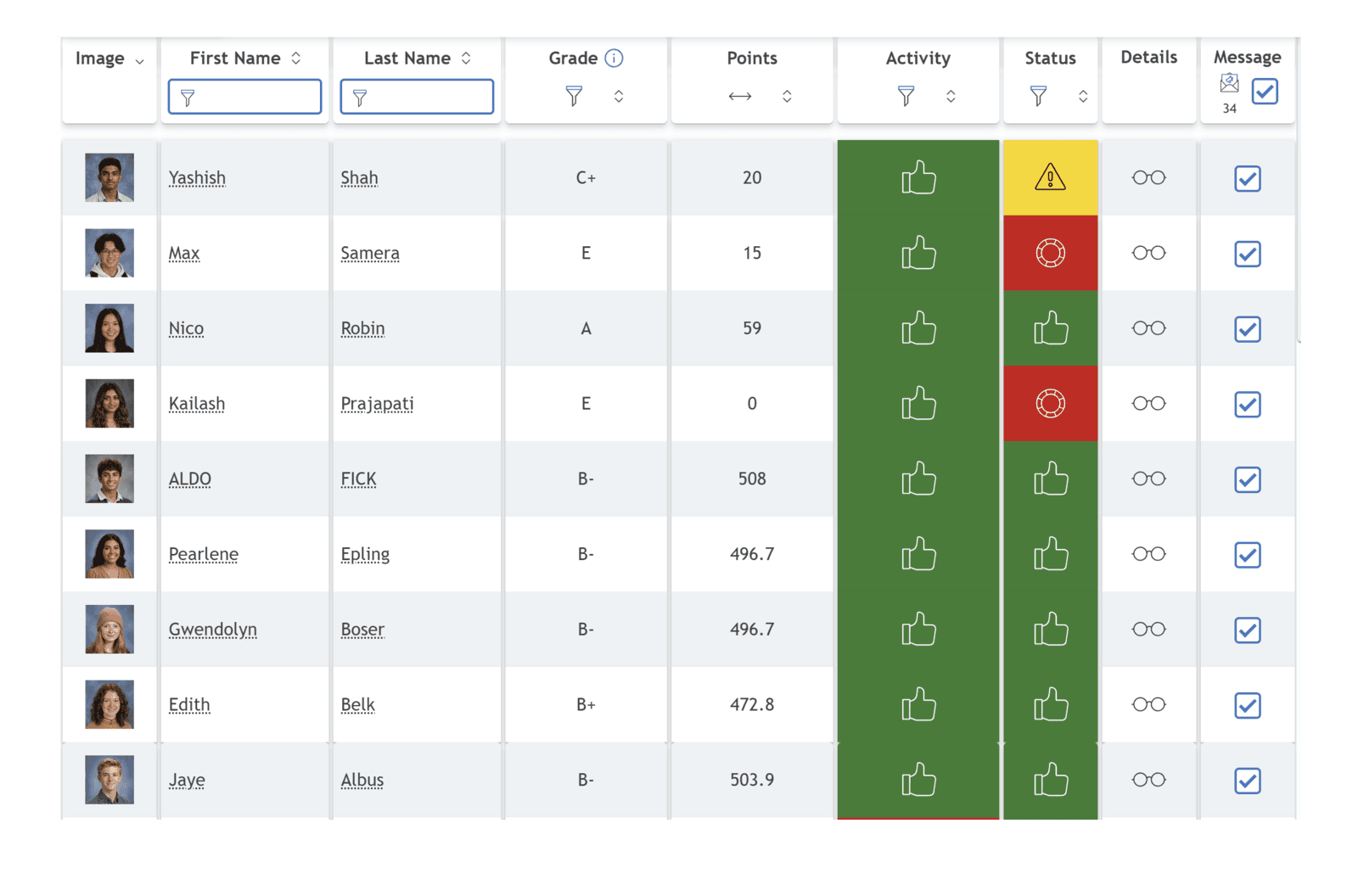
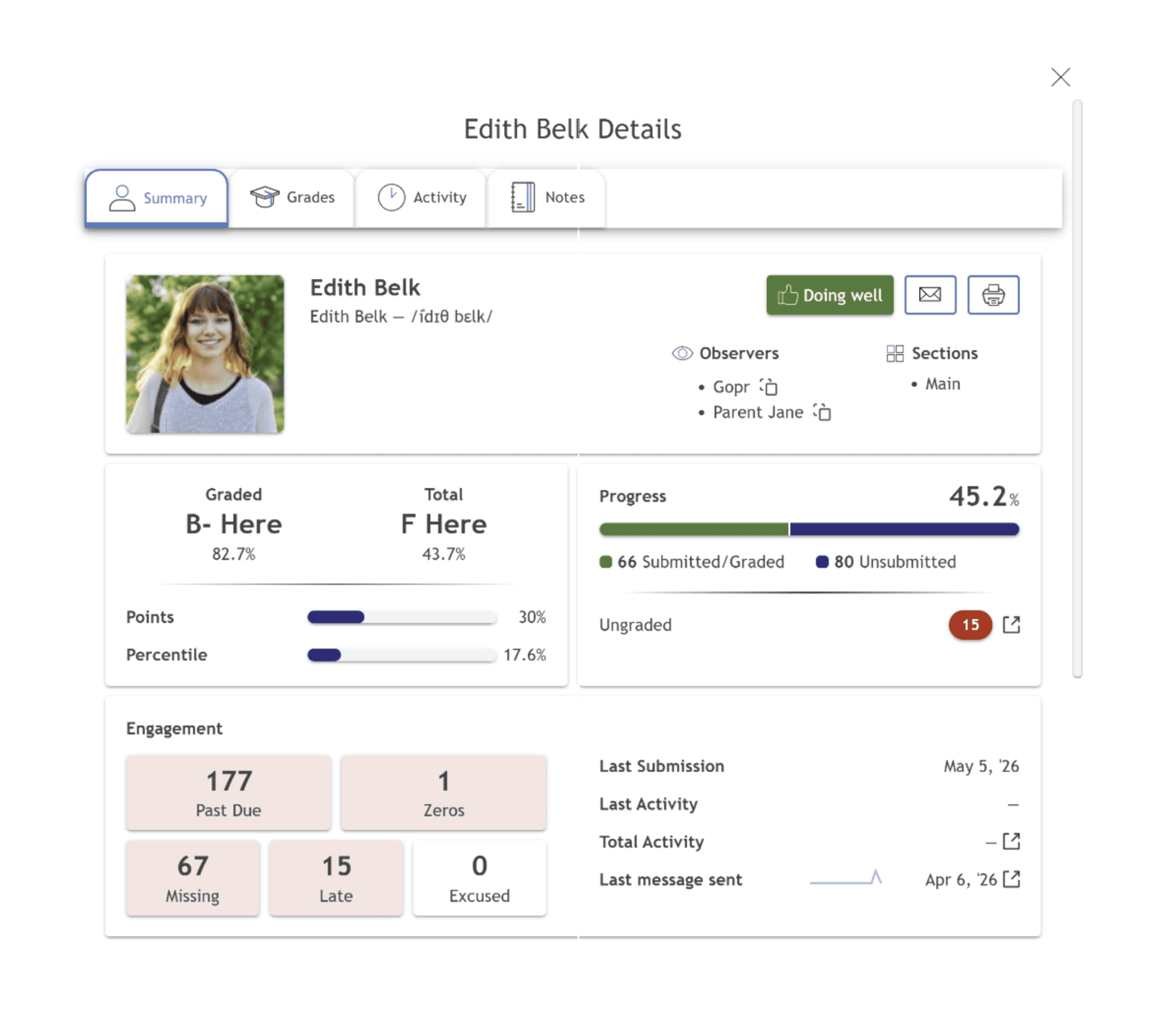
Delphinium pulls all of Canvas's scattered data into one clear view, so teachers see who needs support at a glance, and can reach out in seconds.
“I can see, with color, my students' progress – see their points, their percentages… to tell me where a student is very quickly. This has saved most of my Saturday nights!”
Natalie NiederhauserHigh School Math Teacher, Davis Connect
Community Builder
Stop blasting the whole class. Target exactly the students who need to hear from you, with exactly the right information – automatically. And include their parents too!
“You just saved me hours of mail merging! This saves teachers so much time and really brings that part of personalized learning that we all strive to reach.”
Sarah RuizCurriculum Director
“We can send targeted communication to specific groups of kids – and the data shows us exactly who those kids are.”
Ryan HansenDigital Learning Director
Early intervention for every at-risk student. Do more, in less time.
Engagement Builder
For online students, Canvas is school, and too often it looks like a gray wall of text.

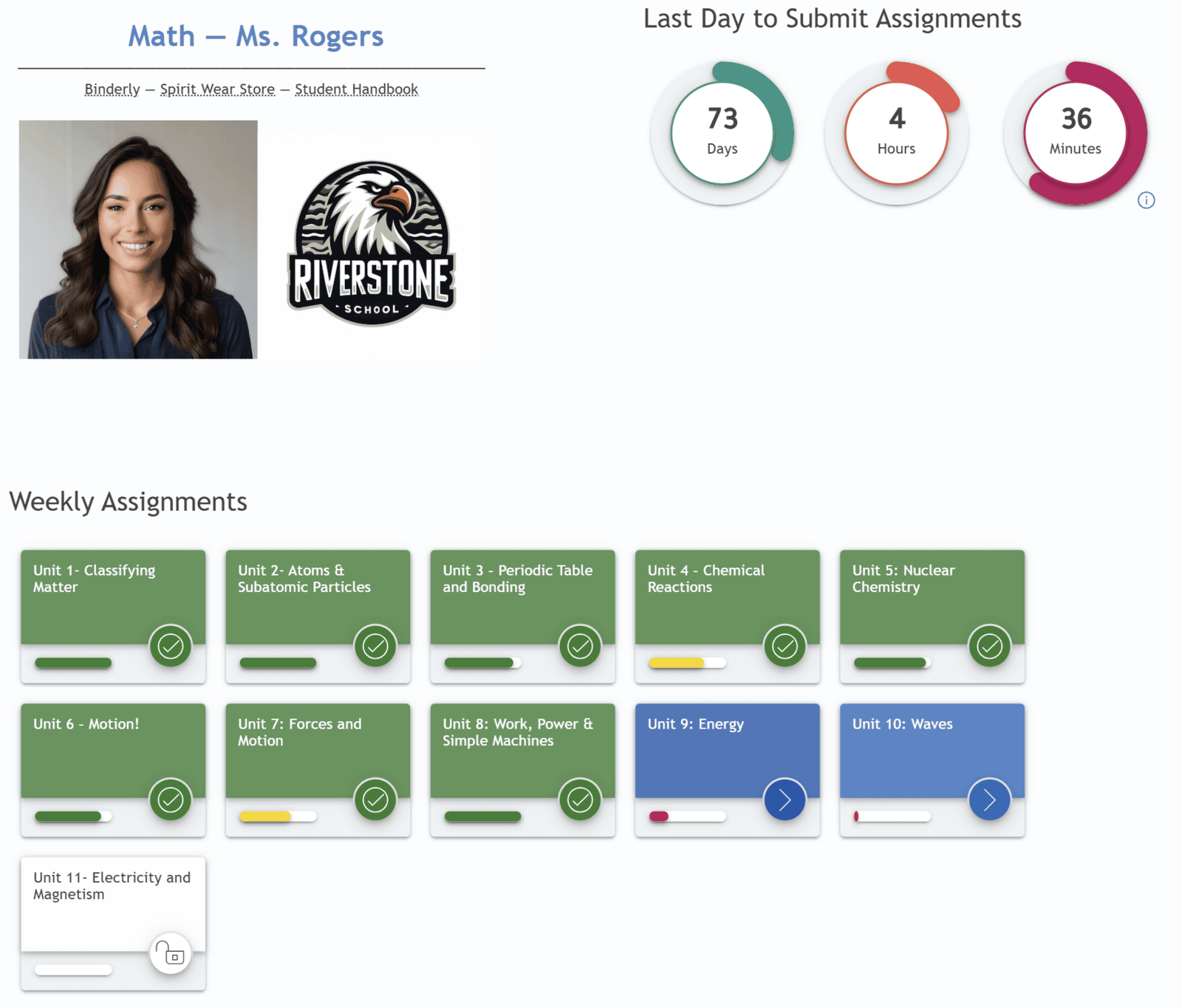
When it's hard to see progress and what's next, students fall behind without realizing it. One missed assignment becomes three, grades start to slip, and by the time a student realizes they're behind, catching up feels out of reach.
With Delphinium, students can see at a glance what's done, what's in progress, and what comes next, so they own the journey.
“If you ask kids, they don't like Canvas. It's basic… it needs something else to engage…”
Ryan HansenDigital Learning Director
“I was sitting on the couch watching Netflix and the thought popped into my head: I could be doing homework right now, and I did!”
Delphinium student survey response
Every app on your student's phone is designed to capture their attention. Delphinium brings that same science of engagement into Canvas, so students build toward mastery instead of watching their grade slip away. Those apps took years to build. Adding Delphinium only takes minutes.
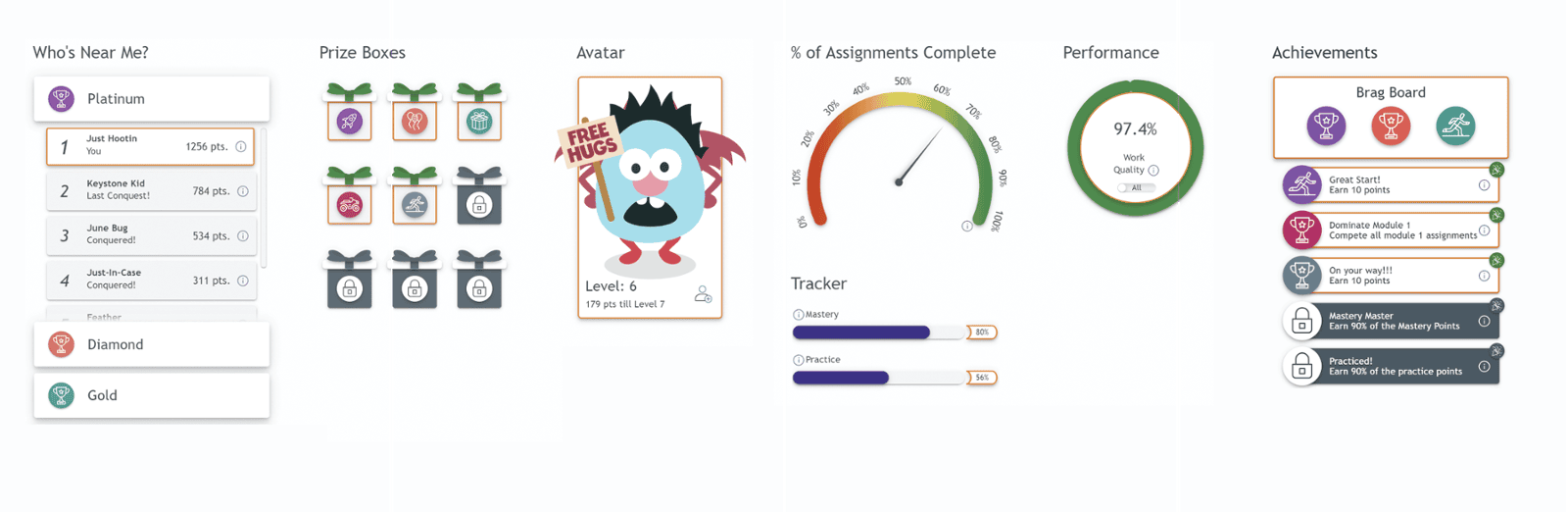


Delphinium automatically creates success signals and milestones from the course you've already built. And teachers can always customize every piece.
“Our students absolutely love the interactive elements where they earn points to enhance their avatars and unlock prize boxes.”
“We have had students redo a quiz that they did poorly on to earn more points so they could just earn googly eyes for their avatar!”
Tiffany DanceInstructional Coach
See who's using Delphinium
Trusted by schools like yours.


The full story


Proof
Long before Delphinium was a product, its founders were researchers, studying what actually drives students to engage, and publishing what they found. Every engagement principle in Delphinium is grounded in peer-reviewed research, built on decades of work by the field's leading scholars.
The Davis Connect study
31%
decrease in course failure rates.
Davis School District, Utah. 72 online classes and 6,000 students.
The courses didn't change. The teachers didn't change. Engagement did, and so did the outcomes.
More from the UVU studies
More motivation
72%
of students say a Delphinium course is more motivating than a traditional Canvas course.
In their words
“Fun.”
One of the most common words students reported when we ask how a Delphinium course is different.
When students have the right information, they can set meaningful goals, monitor their progress, and reflect on what's working, adapting and driving their own learning.
In Delphinium
When next steps are clear, timely, and easy to act on, students are more likely to follow through and build momentum toward success.
In Delphinium
When students feel seen, connected, and supported, they are more likely to engage, participate, and persist.
In Delphinium
Easy to deploy
Go live in less than three minutes. Delphinium adds a layer over the Canvas courses you already have and builds itself from your existing content. You get Delphinium-enhanced Canvas, with no migration, no rebuild, and no new platform.
Teachers keep using Canvas exactly as before. Edits in Canvas flow through automatically. Teachers do not learn a new tool. And because every course shares the same layout, students can navigate all their classes with ease.
FERPAHECVATWCAG 2.1 Level AALTI 1.3US-hosted on AWS
Your schoolprogram already runs on Canvas, Make it work harder for you
Your turn
Meet Dr. Jared R. Chapman, the researcher behind Delphinium. See how it will work in your Canvas courses and get your questions answered.
Schedule a demo with JaredYou're invited
Delphinium + your Canvas courses
Good to know
Delphi M.E., LLC
Effective / Last Reviewed: September 30, 2026
(Non-binding overview — the full terms below control.)
This Agreement governs the relationship between the institutional purchaser identified on the applicable Order Form, invoice, or Statement of Work, and its Authorized Users (collectively, "Licensee"), and Delphi M.E., LLC, whose principal place of business is 1754 E 260 N, Spanish Fork, UT (hereinafter "Licensor"). This Agreement sets the terms, rights, restrictions, and obligations on accessing and using the Delphinium software and related SaaS services (hereinafter "The Software") created and owned by Licensor.
Subject to this Agreement and timely payment of fees under the applicable Purchase Agreement / Order Form / invoice, Licensor grants Licensee a limited, non-exclusive, non-transferable, non-sublicensable (except to Authorized Users), revocable right to access and use The Software as a hosted SaaS service during the subscription Term, solely for Licensee's internal educational and administrative purposes (including delivery of courses to Licensee's enrolled students), in accordance with seat, course, and campus limits stated in the Order Form / invoice / Statement of Work.
"Authorized Users" means Licensee's employees, faculty, and staff (and, where the Order Form contemplates parent/guardian messaging features, parents/guardians contacted only as directed by Licensee), consistent with the Purchase Agreement. Students access The Software only through Licensee's LMS (e.g., Canvas/LTI) as enabled by Licensee; students are not independent licensees under this EULA.
Licensee may not resell, rent, or provide The Software as a standalone commercial product to third parties. Charging tuition or course fees for educational programs that use The Software as part of Licensee's curriculum is permitted and is not a prohibited resale of The Software.
Non-Assignable & Non-Transferable. Licensee may not assign or transfer rights and duties under this license except as the Purchase Agreement expressly permits (for example, to a successor educational entity).
The Term of this license begins on the start date in the applicable Order Form, invoice, or Statement of Work (or the start of a mutually agreed demonstration period) and continues until the end date stated therein, unless earlier terminated under this Agreement or the Purchase Agreement.
Licensor may terminate this Agreement, including Licensee's license, if Licensee:
Licensor may suspend access immediately for material Acceptable Use violations that threaten security or other customers, with notice when practicable.
Upon termination of this license, Licensor shall cease providing the SaaS Services unless a new license or agreement is signed.
Upon termination of this license and upon subsequent written request by the disclosing party, the receiving party of tangible Confidential Information shall return or destroy such information and provide written certification of such destruction, provided that the receiving party may permit its legal counsel to retain one archival copy in the event of a subsequent dispute. Customer Data is handled under the Customer Data section and the Privacy Policy / DPA, not solely under this Confidential Information paragraph.
Updates and Fixes: Licensor may provide Licensee, from time to time, with Upgrades, Updates or Fixes, as detailed herein and according to Licensor's sole discretion. Licensor shall provide any update or Fix free of charge; however, nothing in this Agreement shall require Licensor to provide Updates or Fixes.
Software is provided on an AS-IS basis and is supported only to the extent detailed in this agreement.
As between the parties, Licensee (or Licensee's students/parents as applicable under law) retains all right, title, and interest in data submitted to or collected through The Software in connection with Licensee's courses ("Customer Data"), including education records. Licensor receives only a limited license to host, process, and display Customer Data solely to provide The Software and related support, as described in the Privacy Policy and any signed Student Data Privacy Agreement / DPA / Utah NDPA. Licensor does not sell Customer Data. On termination or Licensee's written request, Licensor will delete or return Customer Data in accordance with the Privacy Policy and applicable DPA (backup residual copies overwritten on normal rotation). If there is a conflict regarding student personal information, the DPA controls over this EULA.
Licensee and Authorized Users will not: (a) reverse engineer, decompile, or attempt to derive source code from The Software except to the extent permitted by law; (b) copy, modify, or create derivative works of The Software except as the SaaS interface allows; (c) rent, sell, or provide The Software as a service bureau to unaffiliated third parties; (d) interfere with or disrupt the integrity or performance of The Software; (e) attempt unauthorized access to systems or data; (f) use The Software to transmit unlawful, harassing, or infringing content; or (g) use The Software in violation of applicable student-privacy or education laws. Licensor may suspend access for material AUP violations that threaten security or other customers, with notice when practicable.
Licensee consents to receive operational communications from Licensor by email and in-product notification relating to use of The Software (onboarding, training, professional development, product education, service notices, and support). SMS/text and phone communications, if any, are governed by the Purchase Agreement (including Authorized User / parent channels and the prohibition on marketing SMS to students) and the Privacy Policy SMS section. Consent to operational email does not waive SMS opt-out rights.
TO THE MAXIMUM EXTENT PERMITTED BY LAW, NEITHER PARTY WILL BE LIABLE FOR ANY INDIRECT, INCIDENTAL, SPECIAL, CONSEQUENTIAL, OR PUNITIVE DAMAGES, OR ANY LOSS OF PROFITS, REVENUE, DATA, OR GOODWILL, ARISING OUT OF OR RELATED TO THIS AGREEMENT, REGARDLESS OF THEORY OF LIABILITY.
EXCEPT FOR A PARTY'S INDEMNIFICATION OBLIGATIONS; BREACH OF CONFIDENTIALITY; INFRINGEMENT OF THE OTHER PARTY'S IP; WILLFUL MISCONDUCT OR FRAUD, EACH PARTY'S TOTAL AGGREGATE LIABILITY UNDER THIS AGREEMENT WILL NOT EXCEED THE FEES ACTUALLY PAID BY LICENSEE TO LICENSOR FOR THE SOFTWARE IN THE TWELVE (12) MONTHS PRECEDING THE CLAIM.
The Software is provided on an AS-IS basis except for any express limited warranty stated in this Agreement or the Purchase Agreement.
Licensor warrants that, to Licensor's knowledge, The Software does not infringe any third-party U.S. patent, copyright, or trademark, and that to the best of its knowledge no legal action has been taken against it for any infringement or violation of any third-party intellectual property rights. Intellectual property risk for authorized use is further addressed in the Licensor Indemnity below.
Except as expressly stated in this Agreement or the Purchase Agreement, The Software is provided without warranty; Licensor disclaims any warranty that The Software shall be error free, without defects, or continuously available. Licensee is responsible for evaluating fitness for its LMS environment, systems, and networks. Licensor does not warrant compatibility with every third-party configuration.
Licensee is responsible for evaluating whether The Software is adequate for Licensee's needs and LMS environment (including via any mutually agreed demonstration period). Licensor does not warrant compatibility with every third-party configuration. This section does not waive rights that cannot be waived under applicable law or express remedies in the Purchase Agreement.
Licensee warrants that they inspected The Software according to the Prior Inspection / Fitness provisions under Warranty above and that it is adequate to their needs. Accordingly, as The Software is intangible goods, except as required by law or expressly stated in the Purchase Agreement / Order Form, Licensee is not entitled to any refund, rebate, compensation, or restitution solely because The Software contains defects, including material flaws. Refund rights for non-delivery or service credits, if any, are solely as stated in the Purchase Agreement.
Licensee will defend and indemnify Licensor against third-party claims arising from Licensee's or Authorized Users' misuse of The Software, Customer Data Licensee provides, or Licensee's violation of law or this Agreement.
Licensor will defend and indemnify Licensee against third-party claims that Licensee's authorized use of The Software as provided by Licensor infringes a U.S. patent, copyright, or trademark, provided Licensee gives prompt notice and reasonable cooperation; Licensor may procure rights, modify the Software, or terminate the affected service with a refund of prepaid unused fees for that portion. Licensor has no obligation for claims arising from combinations not provided by Licensor, modifications by Licensee, or use after notice to stop.
This Agreement is governed by the laws of the State of Utah, excluding conflict-of-law rules. Exclusive venue for disputes is the state or federal courts located in Utah, and each party consents to personal jurisdiction there, unless a signed DPA or Purchase Agreement specifies otherwise. Licensee agrees not to initiate class-action lawsuits against Licensor in relation to this license.
If there is a conflict: (1) a signed Student DPA / NDPA controls for student personal information; (2) then the Purchase Agreement / Order Form; (3) then this EULA; (4) then the Privacy Policy (public description). Product marketing pages are not contract terms.
Send us a note and we'll get back to you.
Thanks for reaching out.
Your message was sent. We'll get back to you.
Need a hand? Create a support ticket and we’ll be right with you.
Thanks. Your ticket was sent.
We'll get back to you.
Research foundation
See the research at work in your own Canvas courses.
Schedule a demoSend us a note and we'll get back to you.
Your message was sent. We'll get back to you.

